How to make money with Donald Trump (and web scraping) in 2026?
It's the new reality in financial markets. President Donald Trump shakes the world (and your portfolio) with every post on his social network Truth Social. I show you here how to scrape truthsocial.com and use the power of AI to know before everyone else.
Disclaimer: This article is published for educational and research purposes only. It does not constitute investment advice.
Your time is valuable, so let's get to it!
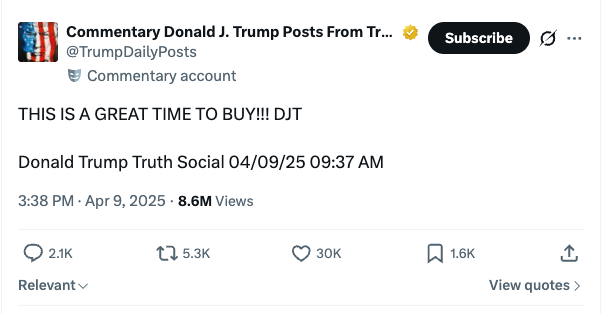
We all remember DJT's post on April 9, 2025 at 9:37 AM (New York time):
"THIS IS A GREAT TIME TO BUY!!! DJT"
A few hours later, markets exploded upward.
There's been a lot of talk about Trump trading.
The principle is simple:
Follow what Trump says → take a position → pocket the gains.
Market moves are violent, even historic.
Between now and the end of his term, Donald J. Trump will certainly continue to move markets.
The real question is:
How do you get alerted first next time?
The April 9, 2025 case study
📉 Early April 2025, markets crash after massive tariff announcements (~$5T erased in 48h).
📱 April 9 at 9:37 AM, Trump posts "THIS IS A GREAT TIME TO BUY!!!" on Truth Social.
⏳ Hours later, a 90-day tariff pause is announced.
🚀 Result at close: S&P +9.5% · Nasdaq +12% · crypto rallying in parallel.
One post. One decision. A historic move.
👉 What interests us here isn't the finance — it's the data.
What this case reveals: a real-time data ingestion problem
So how do you do it?
- post published on truthsocial.com
- data collection
- data analysis -> which market? buy? sell?
First, we need the data in real time. And for once, you don't need to be a hedge fund, you don't need to be Warren Buffett. A computer, a developer, a scraping expert, and let's go. 🚀
To miss nothing, you need to scrape Truth Social continuously, frequently. No webhook, no stream, no push: the only option is high-frequency polling. Whoever has the fastest pipeline reads the signal first.
Why Trump's posts move markets
Since Donald J Trump's return, markets have integrated a new reality:
American economic policy is also communicated on social media.
And not just any platform. Trump posts first on Truth Social — the social network he founded himself, which has become the official communication channel of the President of the United States. Not X, not Facebook: Truth Social is the first place his announcements appear.
Truth Social must be monitored as a priority. What Trump posts there has the weight of an official statement.
Each post can impact:
- stocks
- currencies
- cryptocurrencies
- commodities
- interest rates
- derivatives markets
Result:
Macro desks, hedge funds, traders, and analysts now monitor Truth Social as the number one strategic information source on American economic policy.
The problem: information arrives too late
Monitoring Truth Social manually has several major limitations:
- No official public API
- Unreliable notifications
- Human surveillance impossible 24/7
- Latency between publication and reading
- No parsing or structured data extraction available
Market timing is crucial.
The solution: scrape Truth Social in real time
Web scraping automates what humans can't do manually: monitor a source 24/7, extract every new piece of data quickly, and trigger an immediate action.
Applied to Truth Social, financial data scraping looks like this:
- detect every new post in real time,
- automatically extract and structure the content,
- analyze the news -> buy? sell? which market?
In other words:
Transform a political social network into an actionable financial data feed through web scraping.
Tutorial: scraping Truth Social step by step (Python)
We'll build the web scraper together, block by block.
By the end of this tutorial, you'll have a working Python script that:
- scrapes the latest posts from @realDonaldTrump in real time,
- extracts and structures data automatically (text, date, engagement),
- detects financially sensitive posts via keyword analysis,
- displays everything in a terminal with readable formatting.
Prerequisites
pip install curl_cffi
Why curl_cffi and not requests?
Truth Social is protected by Cloudflare. A standard request with requests will be blocked instantly.
curl_cffi solves this: it reproduces the TLS handshake of a real Chrome browser (same JA3 fingerprint). Cloudflare sees a legitimate Chrome, not a Python bot.
Step 1 — Understanding the API
Truth Social is based on Mastodon, an open-source software.
The Mastodon API is documented and predictable. To retrieve posts from an account, you just need its account ID:
GET /api/v1/accounts/{account_id}/statuses
The account ID for @realDonaldTrump is 107780257626128497.
You can find it easily: open the profile in your browser, inspect network requests (Network tab in DevTools), and look for a call to /api/v1/accounts/.
Why anti-bots have become a real engineering challenge
Cloudflare isn't a simple captcha. It's a behavioral analysis and fingerprinting system that operates at multiple levels simultaneously.
At the TLS level first: every HTTP client has a unique signature — the order of cipher suites, TLS extensions, supported elliptic curves. Python requests has a JA3 fingerprint that's instantly recognizable. Cloudflare compares it against its database of known signatures. If it doesn't look like a real Chrome, the request is blocked or challenged before even looking at the URL.
At the HTTP/2 level: frame ordering, SETTINGS values, stream priorities — all of this forms an additional fingerprint. A real Chrome on HTTP/2 behaves in a very specific way that standard HTTP libraries don't reproduce.
Finally at the application level: cf_clearance and __cf_bm cookies are signed cryptographic tokens that attest a JavaScript challenge was solved in a real browser. They have limited lifespans and are tied to the source IP.
curl_cffi solves the first two levels through impersonation. For the third level — session management and cookie renewal — you need either a headless browser session (Playwright) or a scraping infrastructure that handles this industrially.
In production, this is the main operational challenge: maintaining valid sessions, at high frequency, without getting banned. It's no longer programming, it's infrastructure management.
Step 3 — Configure HTTP headers
Headers must be consistent with a real browser. No need to set everything — curl_cffi automatically generates Chrome headers (User-Agent, sec-ch-ua, etc.) through impersonation.
We only add API-specific headers:
headers = {
    # We want JSON, not HTML
    'accept': 'application/json, text/plain, */*',
    'accept-language': 'fr-FR,fr;q=0.9,en-US;q=0.8,en;q=0.7',

    # Anti-cache to always get the latest posts
    'cache-control': 'no-cache',
    'pragma': 'no-cache',

    # Sec-Fetch headers — indicate an AJAX call from the site
    'referer': 'https://truthsocial.com/@realDonaldTrump/',
    'sec-fetch-dest': 'empty',
    'sec-fetch-mode': 'cors',
    'sec-fetch-site': 'same-origin',
}
And the query parameters:
params = {
    'exclude_replies': 'true',   # We only want posts, not replies
    'only_replies': 'false',
    'with_muted': 'true',
}
Step 4 — Make the request with curl_cffi
This is the centerpiece. We create a session with Chrome impersonation:
from curl_cffi import requests

IMPERSONATE = "chrome"
ACCOUNT_ID = "107780257626128497"
API_URL = f"https://truthsocial.com/api/v1/accounts/{ACCOUNT_ID}/statuses"

session = requests.Session(impersonate=IMPERSONATE)

response = session.get(
    API_URL,
    params=params,
    cookies=cookies,
    headers=headers,
    timeout=30,
)

posts = response.json()
impersonate="chrome" does all the heavy lifting: the TLS handshake, HTTP/2, default headers — everything is identical to a real Chrome.
The API returns a list of posts in JSON format (standard Mastodon).
Step 5 — Parse HTML content
Post content is in HTML (<p>, <br/>, <a>, etc.). We convert it to readable text:
import re
from html import unescape
_HTML_TAG = re.compile(r"<[^>]+>")
def strip_html(raw: str) -> str:
# Convert line break tags to \n
text = raw.replace("<br/>", "\n").replace("<br>", "\n").replace("</p><p>", "\n\n")
# Remove all other HTML tags
text = _HTML_TAG.sub("", text)
# Decode HTML entities (& → &, etc.)
text = unescape(text)
return text.strip()
Step 6 — Detect financially sensitive posts
In the script, we set up a detect_financial() function that scans each post by keywords (tariff, market, nasdaq, etc.). It's enough for a prototype, but limited: keyword detection doesn't understand context.
In production, you need to plug this into an LLM (Claude, OpenAI, Mistral…) for real analysis: sentiment, affected assets, urgency, recommended action. The LLM transforms a raw post into a structured, interpreted signal, not just a binary flag.
Integrating alerts: Telegram, WhatsApp, trading bots
Once the signal is generated, it needs to be delivered instantly wherever you are.
Real-time alerting:
- Telegram Bot — simplest to set up, REST API, immediate push notification on mobile
- WhatsApp — via Meta's Cloud API or third-party services (Twilio, CallMeBot)
- Discord webhook — ideal for trading communities
- Email / SMS — for critical alerts only (higher latency)
Trading bot connection:
- Connect the signal to CCXT (Python library connecting 100+ crypto exchanges) for automatic order execution
- Send the signal to TradingView via webhook to trigger a Pine Script strategy
- Integrate with Interactive Brokers or Alpaca for stock markets
The complete schema looks like this:
Truth Social post
      ↓
   Scraper (curl_cffi)
      ↓
   LLM (signal analysis)
      ↓
   Structured signal { sentiment, assets, urgency }
      ↓
   ┌─────────────┬──────────────┬─────────────┐
Telegram     Discord       Trading bot
  push        webhook        (CCXT / Alpaca)
It's this complete pipeline — from scraping to automated trading orders — that makes the difference between watching markets move and profiting from them first.
Step 7 — Assemble and run
We put it all together. The main script makes the request, parses posts, and displays the summary:
session = requests.Session(impersonate=IMPERSONATE)

response = session.get(
    API_URL,
    params=params,
    cookies=cookies,
    headers=headers,
    timeout=30,
)

if response.status_code != 200:
    print(f"ERR HTTP {response.status_code}")
    raise SystemExit(1)

posts = response.json()

financial_count = 0
for i, post in enumerate(posts, 1):
    source = post["reblog"] if post.get("reblog") else post
    text = strip_html(source.get("content", ""))
    if detect_financial(text):
        financial_count += 1
    print_post(post, i)

print(f"\n  SUMMARY: {len(posts)} posts | {financial_count} market-relevant\n")
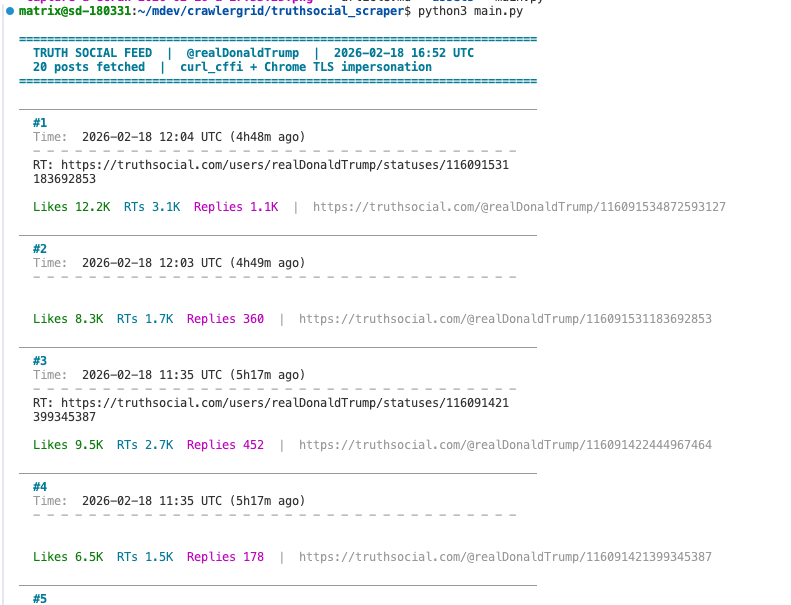
Run the script:
python3 main.py
Financially sensitive posts appear immediately with a red FINANCIAL banner, detected keywords, and engagement metrics.
Result: raw JSON structure of a post
Each post returned by the API has this structure (simplified):
{
  "id": "116086782319939311",
  "created_at": "2026-02-17T15:55:24.364Z",
  "content": "<p>Maryland, Virginia, and Washington, D.C., ...</p>",
  "url": "https://truthsocial.com/@realDonaldTrump/116086782319939311",
  "replies_count": 1694,
  "reblogs_count": 4731,
  "favourites_count": 17902,
  "account": {
    "username": "realDonaldTrump",
    "display_name": "Donald J. Trump",
    "followers_count": 11723542
  },
  "reblog": null,
  "media_attachments": [],
  "language": "en"
}
What's next? Taking the scraper to production
This Python web scraping script is a functional foundation. To go to production and automate financial data extraction continuously, you need to add:
- Polling loop — re-run the scraper every X seconds, compare post IDs to detect new ones
- Alerting — send a webhook (Discord, Telegram, Slack) as soon as a financial post is detected
- Cookie rotation — automate renewal with a headless browser (Playwright, Puppeteer)
- Proxy rotation — bypass rate-limiting for high-frequency crawls
- Structured storage — save each extracted post to a database (SQLite, PostgreSQL) for historical analysis and backtesting
This is exactly what CrawlerGrid does in production: a complete pipeline of scraping, data extraction, and real-time alerting.
Summary: all scraper steps
| Step | What we do | Why |
|---|---|---|
| 1 | Identify the Mastodon API | Truth Social exposes a standard REST API |
| 2 | Get Cloudflare cookies | Bypass anti-bot for scraping |
| 3 | Configure HTTP headers | Consistency with a real browser |
| 4 | curl_cffi + impersonate Chrome | TLS fingerprint identical to Chrome |
| 5 | Extract and parse HTML | Raw data → exploitable structured text |
| 6 | Financial keyword detection | Filter market-relevant posts |
| 7 | Colored terminal display | Real-time visual monitoring |
| 8 | Assemble and run | Working scraper in < 200 lines of Python |
One Trump post. One web scraping request. A trading signal before anyone else.

Note: This article is a practical case study in data engineering applied to scraping open sources. It does not constitute investment advice. The goal is to show how to build a real-time data extraction and ingestion infrastructure from an unstructured source protected by a WAF — the source just happens to be the one that moves markets the most right now.